Tax Exempt
The Tax Exempt report allows users to view the guests on the property that are exempt from taxes, and the revenue posted to that guest’s folio. As a property manager, user can verify tax exempt guests, ensure that the tax ID number for each guest is present, and account for the revenue that was not subjected to the taxes from which the guest is exempt. This report accommodates multiple folios on a single reservation and includes any revenue on the secondary folio(s), if applicable. When a confirmation number is available, it’s linked to the reservation and opens in a separate tab when selected. It’s not available if it does not appear in the report.
Perform the following steps to generate the report:
Navigate to Reports ➜ All Reports ➜ Tax Exempt (under Accounting).
Select the Date Range field from the calendar to generate dates for the report.
The maximum days allowed in the date range is 31.

Select the Exclude Non In-house Reservations checkbox to exclude reservations that are already checked in.
Select the Include cancelled and no show reservations checkbox to include reservations that are no shows or have been cancelled.
Click Generate. The report with the selected data appears.
Click Print to send a copy of the report to the printer.
Sample Report
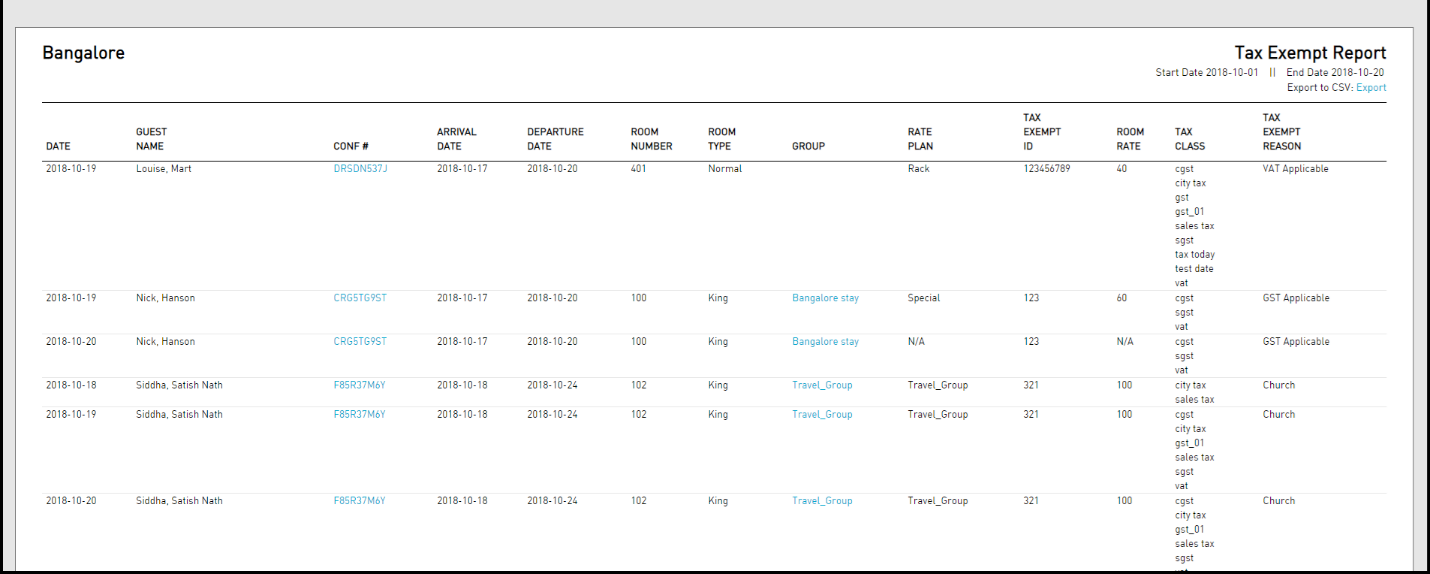
Report Parameters
This report displays the following parameters:
|
Field |
Description |
|---|---|
|
Date |
The property date. |
|
Guest Name |
The name of the main guest of each reservation. |
|
Conf # |
The confirmation number of the reservation. |
|
Arrival Date |
The arrival date of each reservation. |
|
Departure Date |
The departure date of each reservation. |
|
Room Number |
The actual room number (if assigned) of each reservation. |
|
Room Type |
The room number and room type assigned to each reservation within the group. |
|
Group |
The name used to book the group reservation. |
|
Rate Plan |
The rate plan associated with the reservation. If multiple rate plans are associated with the reservation, the rate plan currently in effect appears on the report. |
|
Tax Exempt ID |
The code used to identify the tax exempt category. |
|
Room Rate |
The rate being charged for each reservation. |
|
Tax Class |
This category helps the tax service to determine the type of charge being posted, adjusted, or corrected. |
|
Tax Exempt Reason |
The reason a guest has claimed tax exemption. |